Offline catalog status on the Offline Windows Update card, October 16, 2026
The Offline Windows Update card shows whether your distribution hub has Microsoft's current offline update catalog, as of October 16, 2026. The change is in the ET Ducky cloud API and dashboard, with no agent update, and applies to Windows agents 2.8.2.0 or later that already use offline Windows Update. The screenshots below are from the production dashboard, with any names and ids blurred.
What it shows
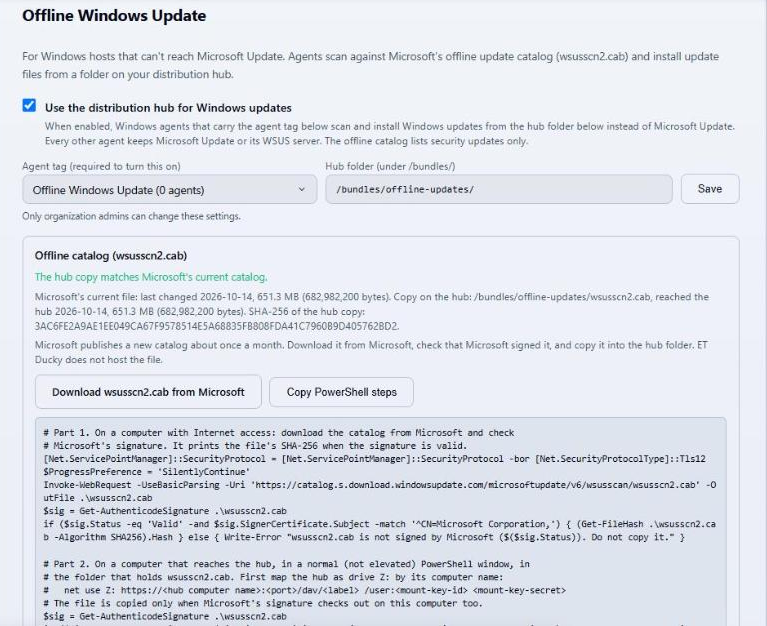
Microsoft publishes a new wsusscn2.cab about once a month. The Offline catalog block on the card compares the copy on your hub with Microsoft's current file and shows one of four statuses (Current, Outdated, Missing, or Unknown). It lists Microsoft's file date and size next to the hub copy's path, arrival date, size, and SHA-256.
Getting a newer catalog onto the hub
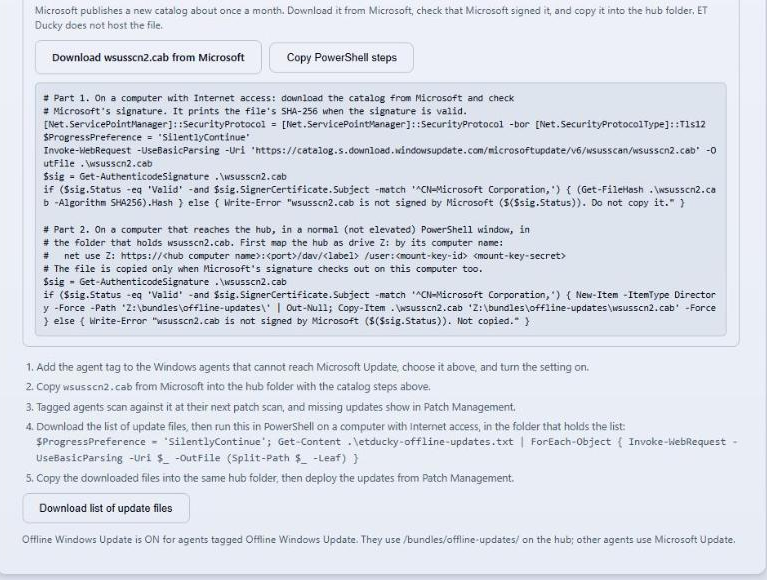
The Download wsusscn2.cab from Microsoft button links to Microsoft's own file. The Copy PowerShell steps button copies two parts. Part 1 runs on a computer with Internet access and downloads the file, checks that Microsoft signed it, and prints its SHA-256. Part 2 runs on a computer that reaches the hub and copies the file into the hub folder only when the signature check passes. Tagged agents pick up the new catalog at their next patch scan.
Limits
ET Ducky does not download, store, or host the catalog. The server checks only the date and size of Microsoft's file and caches that answer, and the status reads Unknown when that check can't reach Microsoft. The offline catalog lists security updates only, and tagged hosts still need a route to an ET Ducky API (the cloud service or a Local-First instance), so it isn't completely air-gapped.
The full steps are in the Patch Management documentation under Keeping the offline catalog current, and the October 14 post covers setting up offline Windows Update.
Read the full steps
The Patch Management documentation covers keeping the offline catalog current, offline Windows Update setup, and troubleshooting.
Open the documentation