Offline Windows Update from the distribution hub, October 14, 2026
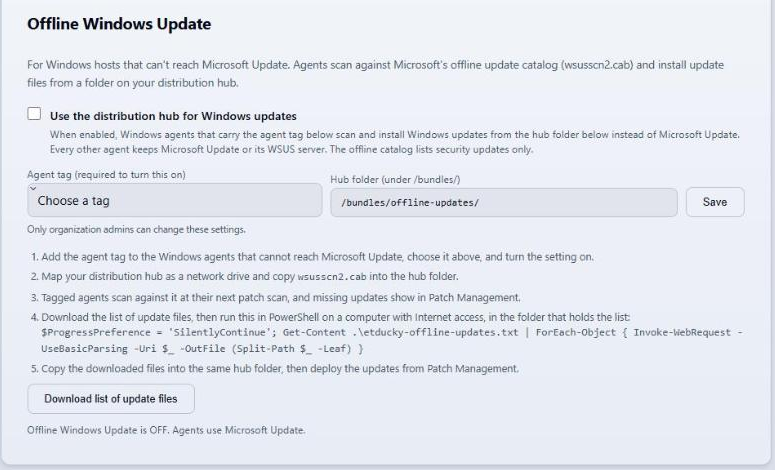
Offline Windows Update went live in the ET Ducky cloud API and dashboard on October 14, 2026, and ships in Windows agent 2.8.2.0. The screenshots below are from the production dashboard and the public documentation, with any names and ids blurred.
What it does
Windows agents that carry an agent tag you choose scan against Microsoft's offline update catalog (wsusscn2.cab) on your Distribution Hub and install update files from a folder on that hub. Every other agent keeps using Microsoft Update or its WSUS server. The offline catalog lists security updates only.
How the update files reach the host
Tagged agents report the Microsoft download URL of each update they are missing. The card's Download list of update files button saves those URLs as etducky-offline-updates.txt, and the PowerShell line on the card downloads every file on a computer with Internet access. You copy the files into the hub folder and deploy the updates from Patch Management as usual. The agent fetches each file from the hub, checks its SHA-256, and hands it to Windows Update. Nothing is downloaded from Microsoft on the host.
Limits
- Every host still needs to reach an ET Ducky API, either the cloud service or a Local-First instance on your network. ET Ducky is not an air-gap product, because a Local-First instance needs outbound HTTPS for sign-in and license renewal.
- The setting can't be turned on without a tag, and only organization admins can change it.
- Hosts on a WSUS server keep using it, including a disconnected WSUS server kept current by export and import.
- Third-party apps use hub folder bundles. Linux hosts use an internal apt, dnf, or zypper mirror that you run.
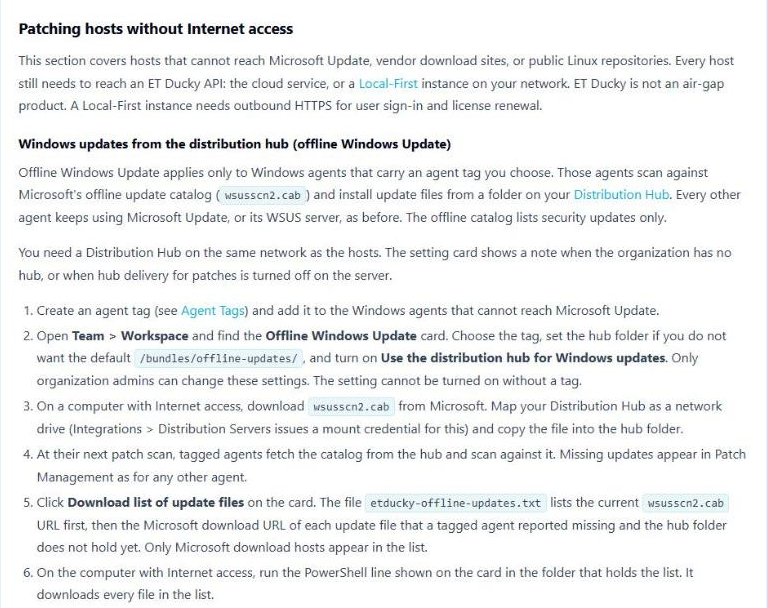
The full steps, WSUS behavior, and troubleshooting are in Patching hosts without Internet access on the Patch Management documentation page.
Read the full steps
The Patch Management documentation covers setup, WSUS hosts, third-party apps, Linux mirrors, and troubleshooting.
Open the documentation