Remote control at the Windows sign-in screen, October 26, 2026
Windows agent 2.8.4.6, released on October 26, 2026, lets remote control connect to a Windows machine where nobody is signed in, for example right after a restart. The session opens on the Windows sign-in screen when Allow Ctrl+Alt+Del and Allow viewing and control of the secure desktop are both on. The screenshot below is from the production dashboard, with any names and ids blurred.
What happens when nobody is signed in
Before this release, the remote control session did not start until someone signed in at the machine. On agent 2.8.4.6 and later, the session opens on the sign-in screen. You can see it, type and click on it, and send Ctrl+Alt+Del from the Keys menu or with Ctrl+Alt+End.
When someone signs in, the session moves to that user's desktop on the same page, and you don't reconnect.
The two permissions
Both permissions are in the Remote control capabilities card, which you open from Systems and then Security. They apply to every Windows agent in the organization and are off unless granted.
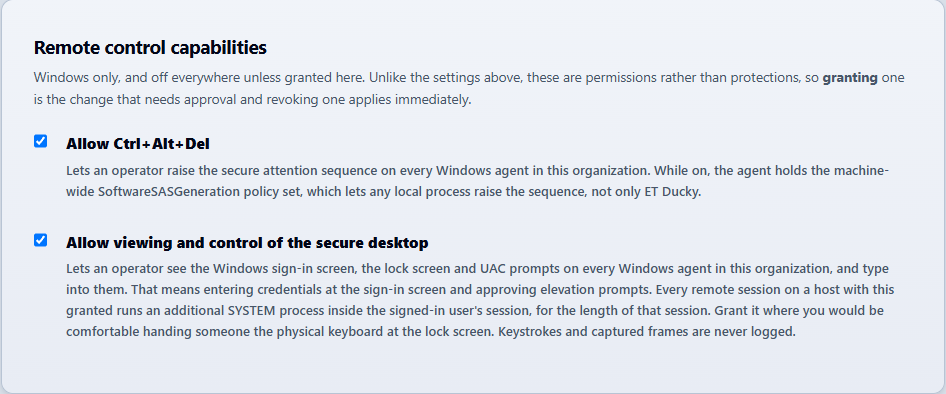
With either permission off, the session still does not start when nobody is signed in, and the agent logs event 11033.
Limits
- Linux agents have no sign-in screen session.
- Agents older than 2.8.4.6 still need a signed-in Windows session before remote control starts.
- Until someone signs in, the session shows one screen, the Quality menu has no effect, and the clipboard does not sync.
- If the connection drops while the sign-in screen is showing, the session ends and you start a new one.
The full reference is in the Remote Desktop documentation.
Read the full reference
The Remote Desktop documentation covers the sign-in screen, UAC prompts, the Keys menu, and the two remote control permissions.
Open the documentation