Run as root in the Linux Live Session shell, November 5, 2026
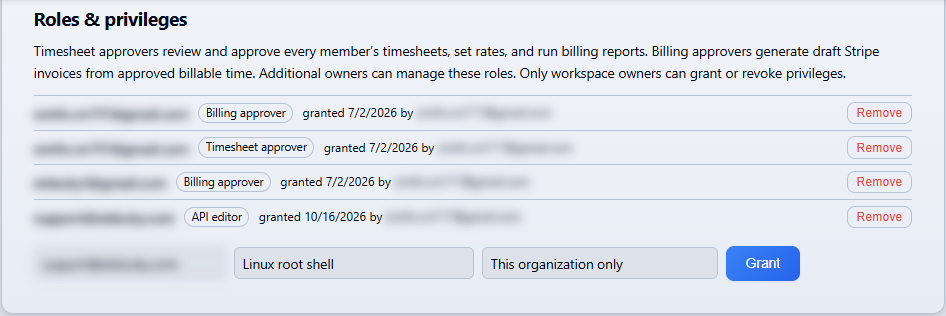
On November 5, 2026, ET Ducky added "Run as root" to the Live Session shell for Linux agents newer than 2.8.5.3. A command sent with the box ticked runs as root through the agent's own privileged path, after a permission check, and writes an audit entry. The screenshot below is from the production dashboard, with names and email addresses blurred.
What a root command needs
Three conditions must hold before the dashboard sends a command as root.
- The member holds the "Linux root shell" privilege. Workspace and organization owners hold it. Administrators and members hold it only when an owner grants it to them by name. It cannot be attached to an invitation.
- The host administrator created
/etc/etducky/root-shell.enabled, owned by root, and restarted the agent so it reports the setting. - The host runs a Linux agent newer than 2.8.5.3, installed from the .deb or .rpm package.
sudo install -o root -g root -m 0644 /dev/null /etc/etducky/root-shell.enabled
sudo systemctl restart etducky-agent
Deleting the file turns it off. The host refuses root commands from then on.
Granting the privilege
An owner grants "Linux root shell" in Team, Workspace, "Roles & privileges". The grant can cover one organization or every organization in the workspace.
How the command runs
The agent runs one fixed command line, which is the only form its sudoers rule allows. systemd starts a root-owned script as its own service, outside the agent's sandbox. The command reaches the script on standard input.
sudo -n /usr/bin/systemd-run --pipe --wait --collect --quiet /opt/etducky/agent/scripts/etducky-root-shell.sh
Each root command is recorded three times. The dashboard audit log gets a shell_root_command entry with the member, the source address, and the command's SHA-256. The agent's audit log gets a line with the command id. The host journal gets entries under the tag etducky-root-shell, which can be read with sudo journalctl -t etducky-root-shell.
sudo in the shell
On Linux agents newer than 2.8.5.3, typing sudo in the shell fails at once unless the agent's sudoers policy covers the command. The shell then suggests "Run as root". On agents 2.8.5.3 and older, a sudo line still waits up to five minutes for a password prompt the dashboard does not show. Upgrade those agents.
Limits
There is no interactive terminal, and the command's input is empty. The timeout is 5 minutes. Root commands pass the same blocked-command checks as other shell commands. Only typed commands run as root, so saved scripts and commands the AI proposes never do. Hosts installed with the .run installer have no sudoers file, so "Run as root" is not available there.
The full reference is on the Linux Agent page, with the shell itself described on the Live Sessions page and the privilege on the Team page.
Read the full reference
The Linux Agent documentation covers the host opt-in file, the sudoers rule, the three audit records, and the limits of Run as root.
Open the documentation