Known exploited vulnerability alerts, November 20, 2026
The ET Ducky cloud API and dashboard release of November 20, 2026 (database migration M187) matches CISA's Known Exploited Vulnerabilities catalog against the applications installed on managed Windows and Linux devices and against network devices without an agent. Matches are listed on a new Vulnerabilities tab under Systems > Patch Management, and a new automation trigger can send an alert, open a ticket, or call a webhook when a newly added CVE affects your devices. No agent update is needed. It's included on every plan. Every screenshot is from the production dashboard, with host names blurred. The Patch Management documentation is the full reference.
What changed
- ET Ducky downloads the catalog about every 6 hours, from cisa.gov or from CISA's GitHub copy when cisa.gov does not answer.
- Every hour, each organization's latest installed-application inventory and its Network Discovery devices without an agent are matched by vendor and product name against catalog entries added in the last 365 days.
- For Windows applications, the installed version is compared with the affected version ranges that NVD publishes for the CVE. A copy outside every range is hidden and never alerts.
- The "Known Exploited Vulnerability" automation trigger fires once per CVE added in the last 7 days.
- Self-hosted instances receive the catalog and the NVD ranges from etducky.com through the same relay as the threat-intel blocklist.
The Vulnerabilities tab
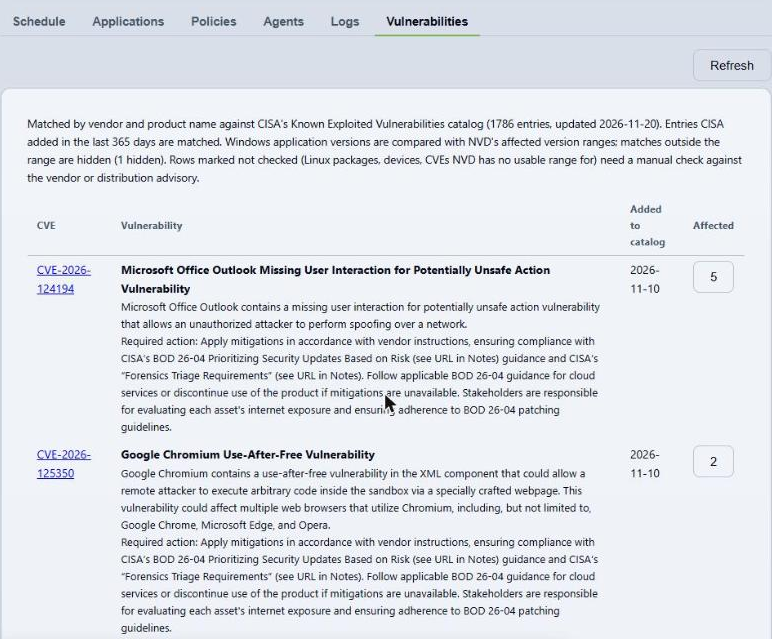
Open Systems > Patch Management and click "Vulnerabilities". A note above the table gives the catalog size, the date it was updated, and how many matches the version check hid. Each row is one CVE with its NVD link, CISA's description and required action, the date CISA added it, and the number of affected devices.
Affected devices and the version check
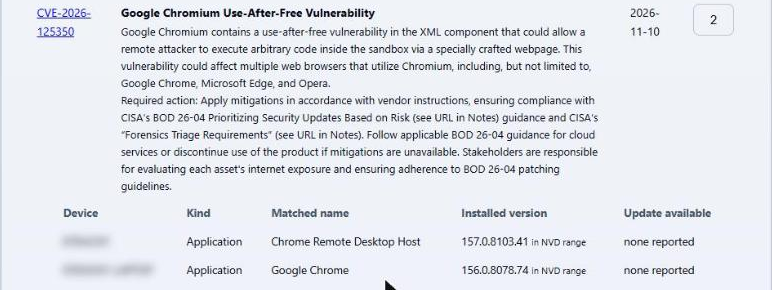
Click the number under "Affected" to list each device with the application name that matched, the installed version, and any newer version a patch scan reported. A Windows application inside NVD's affected range is marked "in NVD range".
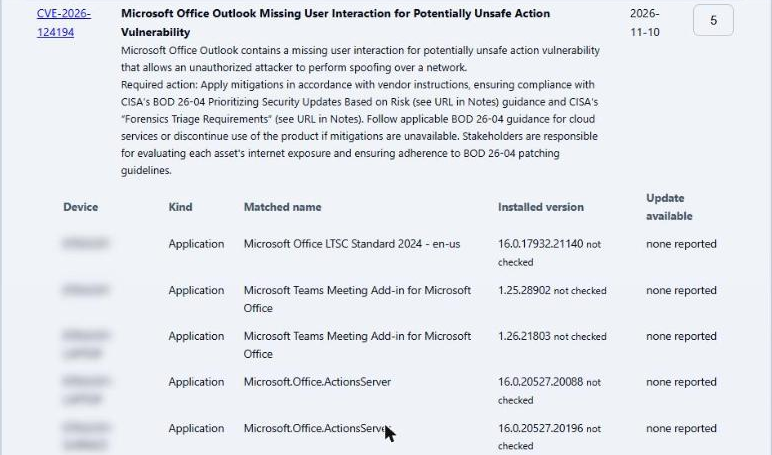
Linux packages, devices, and CVEs NVD has no usable range for are marked "not checked". A name match is only a name match, so check those rows against the vendor or distribution advisory. The Outlook entry below matched five applications marked "not checked", including the Teams Meeting Add-in.
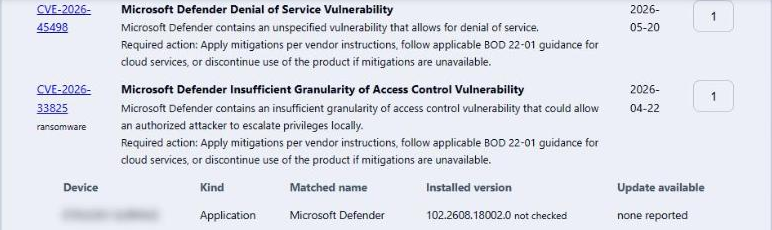
A "ransomware" label under the CVE means CISA lists known use in ransomware campaigns.
Alerts for new CVEs
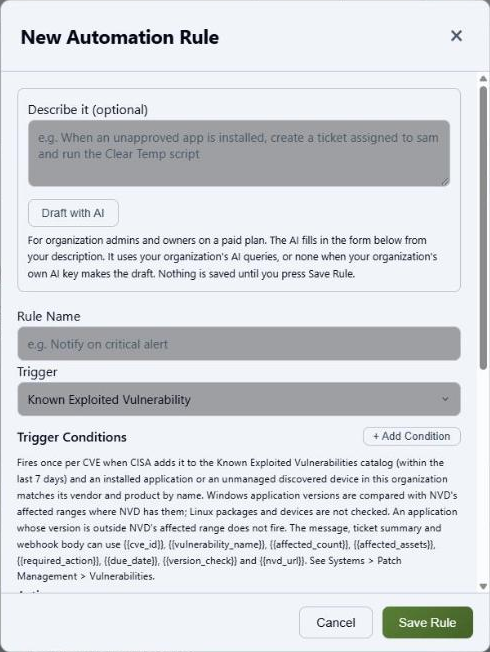
Open Systems > Automations, click "+ New Rule", and pick "Known Exploited Vulnerability" as the trigger, then add a "Trigger Alert", "Create Ticket", or "Fire Webhook" action. The trigger fires once per CVE for your organization, for a CVE CISA added in the last 7 days. A CVE added earlier is listed on the tab without an alert. Messages, ticket summaries, and webhook bodies can use {{cve_id}}, {{vulnerability_name}}, {{affected_count}}, {{affected_assets}}, {{required_action}}, {{due_date}}, {{version_check}}, and {{nvd_url}}.
Limits
- Devices without an agent are matched by the vendor of their network card, for router, firewall, storage, and camera vendors such as Fortinet, Ubiquiti, Synology, and TP-Link. The scan knows the vendor and not the model.
- Catalog entries for Windows itself and the Linux kernel never match. Windows Update and Linux patching cover those.
- Windows updates (KB rows) are not checked, and an affected application can be missed when its name differs from the catalog's product name.
- A row leaves the tab when the application is removed, its agent is deleted or deactivated, the device gets an agent or a scan has not seen it for 30 days, or the catalog entry is more than 365 days old.
The Automations documentation lists the trigger's conditions. This product uses data from the NVD API but is not endorsed or certified by the NVD.
Read the full reference
The Patch Management documentation covers how matching works, the NVD version check, the Vulnerabilities tab, alerts, and self-hosted instances. The Vulnerabilities tab and the Known Exploited Vulnerability trigger are included on every plan. One Windows or Linux server costs $5 a month with no query subscription. See pricing
Open the documentation